Remove an employee's phone system access
What removing a departed employee's phone system access has to do, in one action, what should stay behind for you, and why it cannot lock you out.
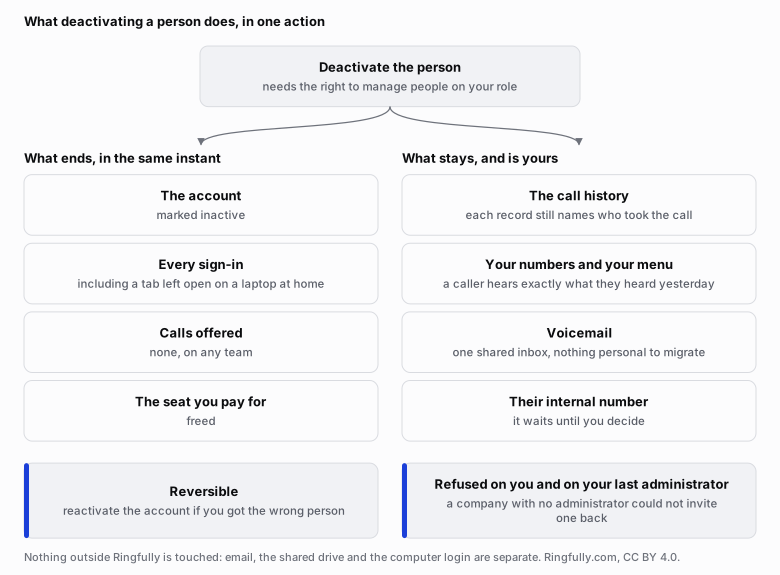
Deactivating a person is one action with two halves: what ends in the same instant, and what deliberately stays with you.
Reuse this figure anywhere, including commercially, with credit to Inbound CX and a link back to this page. CC BY 4.0.
In this article
The afternoon someone leaves, one action should sign them out everywhere, stop calls being offered to them, free their seat and keep their call history for you. It should be reversible if you were wrong, and it should be impossible to lock yourself out doing it.
What does removing access have to mean?
Four things at once: they cannot sign in, calls are no longer offered to them, you stop paying for their seat, and everything they did for you stays yours. If those are four separate chores on four separate screens, one of them gets missed.
In a business of eight people, the person leaving was often the one who answered the phone most. Their last day is a handover: the customer files, the keys, the half-finished quotes. The phone login gets a “we will sort that out later”.
With a phone on the wall, later was harmless: the handset stayed on the desk. With the phone on your computer, the login is the phone. It still works from a laptop at home, and it still works next month. A login nobody remembers to close is exactly where an overnight surprise on the phone bill starts.
That is why the four have to happen together rather than one screen at a time.
One action, five effects
In Inbound CX, deactivating a person is one action, and it needs the “manage people” box ticked on your role. It does five things in the same instant.
- Their account is marked inactive.
- They are taken off the line: no new call is offered to them, on any team.
- Their live sessions end and every sign-in is cut, including a browser tab still open on a laptop at home. Not on their next click; now, because the session is ended where it is held rather than checked again at the browser.
- Their seat is freed.
- Their call history is kept, and each record still names who took the call.
Two guards sit around it. It is reversible: if you deactivated the wrong person, or the person comes back in the spring, you can reactivate the account. And it refuses to deactivate you, or your last administrator. A company with no administrator could not invite one back, so the product will not let you get there: give somebody else the administrator role first, then try again.
What stays, and why
The call history stays because it is the company's, not theirs. A customer calling back on Monday about a quote given on Thursday needs you to see the Thursday call and who handled it.
Your published numbers are untouched. A number points at your phone menu, and the menu points at teams, so nobody's departure changes what a caller hears. The person simply stops being one of the people the team rings.
Voicemail is one shared inbox for the company, so there is nothing personal to migrate and no message stranded in a box only they could open. Their short internal number is not reassigned automatically; it waits until you decide.
The day-one mirror: what a new hire should not see
Removing access is half of the same question. The other half is the person who started this morning and can, on some systems, see the whole company's call history by lunchtime.
Inbound CX answers both with roles: three ready-made ones, or your own, built by ticking exactly what each person may see and do. Their own call history against the whole company's is one of those boxes. Who can see what walks through the list. A change applies the moment you save it, so tightening a role after the fact is not a next-sign-in promise.
If you are wondering whether this matters beyond tidiness, it does: limiting who sees personal information is part of what Law 25 asks of a phone system.
What we do, and what we do not
Nothing connects to whatever your company already uses to let people in. An account on Inbound CX is created here and removed here, and nothing outside will remove it for you. That is why it has to be one action rather than a procedure.
Removing someone from your email, your shared drive or their computer login is separate, and yours to do.
A person removed keeps nothing: no sign-in, no calls, no seat. A phone they took home is a different matter. That is your property to recover, not something the system can reach.
Roles are set up with you at the start, so the afternoon somebody leaves is one action here rather than a call to a provider.
Questions people ask
- How do I remove an employee's access to the phone system when they leave?
- Deactivate the person. In Inbound CX that is one action, and it needs the manage people box ticked on your role. It marks the account inactive, takes them off the line so no new call is offered to them, ends every live session, frees their seat, and keeps their call history for you.
- Does deactivating someone close a browser tab left open at home?
- Yes, and immediately rather than on their next click, because the session is ended where it is held rather than checked again at the browser. A phone they took home is a different matter: that is your property to recover, not something the system can reach.
- What happens to a departed employee's call history?
- It stays, and each record still names who took the call. The history belongs to the company rather than to the person, because a customer calling back on Monday about a quote given on Thursday needs you to see the Thursday call and who handled it.
- Can I undo it if I deactivate the wrong person?
- Yes. Deactivation is reversible: you can reactivate the account if you got the wrong person, or if they come back in the spring. The product also refuses to deactivate you or your last administrator, because a company with no administrator could not invite one back.
- What happens to their voicemail and their extension?
- Voicemail is one shared inbox for the whole company, so there is nothing personal to migrate and no message stranded in a box only they could open. Their short internal number is not reassigned automatically; it waits until you decide what to do with it.
Key takeaways
- When someone leaves, one action should sign them out everywhere, stop offering them calls, free their seat and keep their call history.
- In Inbound CX, deactivating a person ends every live session at once, including a browser tab left open on a laptop at home.
- Their call history stays with the company, and each record still names who took the call, so you can see who handled a customer before.
- Deactivation can be undone, and the product will not let you deactivate yourself or your last administrator.
- Removing their email, shared drive and computer login is a separate job, and a phone they took home is yours to recover.
Ask us about your own phone line
If the wrong people can see too much, or somebody who left can still get in, tell us how many people you have and what each should see, and we will set the roles up with you.
Talk to us